
MacBook Air Keyboard Repair and Replacement in Brooklyn (Bay Parkway)
MacBook Air keys sticking, dead or typing twice?
We repair keyboards on MacBook Air M1, M2 and M3 and on the 2018–2019 Intel MacBook Air with the butterfly keyboard. Don’t pry keycaps off. After a spill, shut the MacBook Air down, unplug it and bring it in as it is. We find out whether a key, the keyboard or something under it failed, quote the repair and start only after your yes. Diagnostics cost $75 and are credited toward the repair if you approve it. Walk in at 6908 Bay Parkway, send the form below, or mail it in.
June–October 2026 at our Bay Parkway store: 33 MacBooks came in for repair (all repair types) and 26 were repaired; the median bill was $231.
Ask RepairsBay for Repair
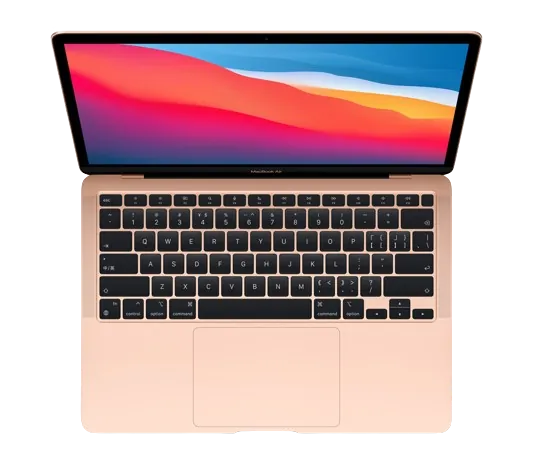
Is your MacBook Air Keyboard giving you trouble? Whether it’s due to accidental spills, stuck or unresponsive keys, or any other form of damage, Repairs Bay repairs and replaces MacBook Air keyboards in Bensonhurst, Brooklyn. We have been in business for over 15 years.
When you bring your Macbook Air to us, we perform a complete evaluation to determine the source of the keyboard damage. You get a quote, and we perform the necessary repairs after you approve it. We have the experience to deal with a wide range of keyboard issues, including lagging keys, key register issues, and physical damage.
Apple MacBook Air Keyboard Repair Services
Your MacBook Air’s keyboard is a crucial component, but it’s not immune to damage. Which keyboard your MacBook Air has decides what the repair looks like:
- MacBook Air M1, M2 and M3. These models use the scissor-switch Magic Keyboard. Single keys, stuck keys after crumbs or a spill, and dead rows are the usual faults.
- MacBook Air 2018–2019 (Intel, Retina). These models use the butterfly keyboard, where dust under a key is enough to make it stick or repeat. The keycaps and clips are thin and break if levered off.
On MacBook Air the keyboard sits in the top case, so a full keyboard replacement is a bigger job than swapping one key. We tell you which repair your model needs after diagnostics. For other MacBook keyboards, see MacBook keyboard repair.
service details

Common Causes of MacBook Air Keyboard Damage
Here are some common causes of damage to your keyboard:
- Liquid Spills: Accidental spills are a leading cause of keyboard damage. Even a small amount of liquid can seep into the keys and affect their functionality. See MacBook water damage repair.
- Dust and Debris Accumulation: Dust, crumbs, and other particles can find their way underneath the keys, causing them to become sticky or unresponsive. Sometimes a MacBook cleaning is enough.
- Physical Impact: Dropping your MacBook Air or subjecting it to physical impact can result in damage to the keyboard, leading to misalignment or non-functional keys.
- Wear and Tear: Over time, continuous use can lead to wear and tear of the keyboard components. You may notice this as key inconsistencies, such as keys becoming loose or not registering properly.
- High Moisture Environment: Operating your MacBook Air in a high-moisture environment, such as a kitchen, can contribute to the degradation of the keyboard over time.
Don’t let keyboard issues hinder your MacBook Air’s performance.
How MacBook Air Keyboard Repair Works
- Diagnostics – we test every key, the backlight and the keyboard cable to find what actually failed. Diagnostics cost $75.
- Quote – you get a price for your model and approve it before we start. If we find another fault during the repair, we stop and quote it first.
- Parts – we use compatible parts by default. OEM parts are available on request when we can get them, and the option is confirmed before work starts.
- Repair – depending on the fault, we clean the keyboard, replace keys or replace the keyboard.
- Testing and pickup – we test every key again and go over the repair with you. Repairs come with a 30-day warranty; liquid damage repairs carry none.
Board-level and complex liquid damage cases can go to the network’s Manhattan lab; the device stays with iFix New York. Other MacBook Air faults? See MacBook Air repair or MacBook Air screen repair.
MacBook Air Keyboard Repair Cost
Diagnostics cost $75 and are credited toward the repair if you approve it; if you decide not to repair, you pay only the diagnostic. The keyboard price depends on the MacBook Air model, the damage and the part, so we quote it after inspection. We offer quotes for all repairs, ensuring you have a clear understanding of the costs before proceeding.
FAQ
How much does MacBook Air keyboard repair or replacement cost?
Diagnostics cost $75 and are credited toward the repair if you approve it. The price depends on the model (M1, M2, M3 or an Intel MacBook Air), the fault and the part, so we quote it after inspection. You approve the total before we start.
Do you repair the 2018–2019 MacBook Air butterfly keyboard?
Yes. We repair sticky, repeating and dead keys and broken keycaps on the 2018 and 2019 Intel MacBook Air. If the switches under the keys are worn, we tell you whether the keyboard needs replacing.
Is it possible to replace specific keys or do I need a complete MacBook Air keyboard repair?
If only one or a few keys are causing you issues and the mechanism under them is intact, replacing those keys is a possible solution. If the damage goes deeper, for example after a spill, replacing the entire keyboard may be the best option. We tell you which after diagnostics.
How long does a MacBook Air keyboard repair usually take?
Sometimes we have to order replacement parts and that may take some time. We tell you the timeline after diagnostics, before you approve the repair.
Can I perform a MacBook Air keyboard repair by myself?
Although some people attempt DIY repairs, keyboard repairs are complex. Attempting to fix the keyboard without adequate knowledge may cause additional damage. MacBook Air keycaps and clips break easily. If a key won’t come back, bring it in before you try to pry it off.
Will my warranty be affected if I get a MacBook Air keyboard repair from a third-party service?
If your MacBook Air is still covered by Apple, check with Apple first. However, you should review the terms of your warranty, as some Apple warranties may only cover repairs performed by approved service providers. Our repairs come with a 30-day warranty; liquid damage repairs carry none.
repair estimate
Diagnostics cost $75 and are credited toward the repair if you approve it; if you decide not to repair, you pay only the diagnostic. The MacBook Air keyboard price depends on the model, the damage and the part, so we quote it after inspection, before any work starts.