
Lenovo Legion Go Repair on Bay Pkwy, Brooklyn
Legion Go broken? What we fix
- Screen: cracked, flickering or black display
- Joystick drift: stick replacement on the detachable controllers
- Charging and power: won’t charge from either USB-C port, battery drains, won’t turn on
- Water damage and SSD upgrades
Diagnostics cost $75 and are credited toward the repair; the exact price comes after inspection. Walk in at 6908 Bay Parkway, send the form below, or mail it in.
June–October 2026 at our Bay Parkway store: 42 game consoles came in for repair (all repair types) and 41 were repaired; the median bill was $163.
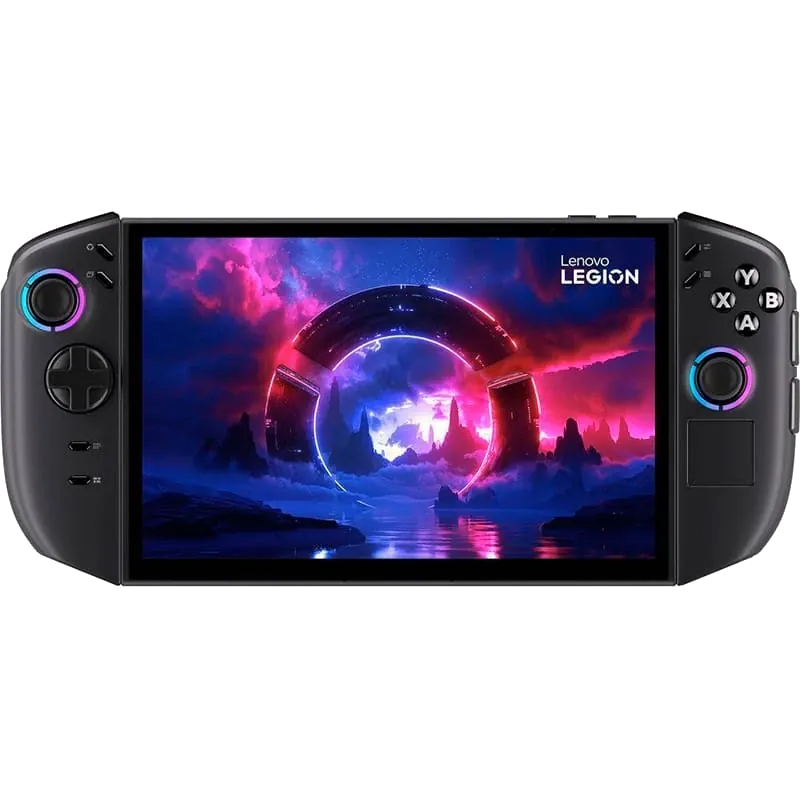
Lenovo Legion Go Repair in Bensonhurst, Brooklyn
Ever had to deal with that joystick drift or overheating? That can happen sometimes with your Lenovo Legion Go. Such an expensive handheld gaming device, but it might just not turn on or stop charging. Before thinking about replacing the faulty device, bring it to Repairs Bay, part of the iFix New York network. We replace Legion Go screens and joysticks, upgrade the SSD, and repair charging, power and water damage faults.
You approve the price before any work starts.
Common Legion Go Issues
Here is what we fix on the Legion Go, by symptom:
- Joystick drift: Characters have odd movements – We replace the broken joystick
- Charging port: Console won’t charge – The Legion Go has two USB-C ports, top and bottom. If one port charges and the other doesn’t, the port is likely at fault; if neither charges, we check the battery and the charging circuit
- Battery degradation: The battery drains quickly – Battery replacement
- Power problems: The Legion Go won’t turn on – We test the battery, charging and power circuits; board-level faults can go to our network’s Manhattan lab
- Damaged screen panel: Cracked/flickering screen – Screen or LCD panel swap
- Water damage, corrosion: Dirt or water inside your device – Cleaning and micro-soldering
- Storage: Out of space for games – SSD upgrade to a larger drive
Overheating or a loud fan: we clean the fan and the heatsink, replace the thermal paste, and replace the fan if it is worn.
service details

Why Repairing a Legion Go Feels Risky — And Why It Shouldn’t
Approval first. At Repairs Bay, we have an approval-first policy. We start only after you approve the amount; if we find another fault during the repair, we stop and quote it separately. If you decide not to repair, the $75 diagnostic fee is all you pay.
No unnecessary replacements. We don’t push upgrades you don’t need: we try to save your electronics.
We fix less-common devices. The Lenovo Legion Go is an unusual handheld PC. We also repair the Steam Deck and the Asus ROG Ally, and complex hardware failures are escalated to our network’s Manhattan lab.
We protect your data. Hardware repairs don’t require access to your accounts — we don’t go into the game libraries, settings, or mess with passwords.
30-day warranty. Repairs come with a 30-day warranty; liquid damage repairs carry none, and neither do parts you bring yourself.
Parts, Board-Level Work and the Manhattan Lab
- Joystick, screen and battery parts are compatible by default, OEM on request when available; we confirm the option before work;
- Screen and joystick replacements depend on the part being in stock;
- Board-level work, such as a Legion Go that won’t power on or a board damaged by liquid, can go to our network’s Manhattan lab.
We are part of the iFix New York network. Our Bensonhurst shop handles all simple and medium-level fixes. Some complex cases are escalated to our network’s lab in Manhattan. Your device never leaves our organization.
Lenovo Warranty or Local Repair?
If your Legion Go is still under Lenovo’s warranty and the fault is a defect, check your coverage by serial number on Lenovo’s support site first. Lenovo’s limited warranty does not cover accidental damage, such as a cracked screen or a spill, or damage caused by an outside repair shop. For accidental damage, an expired warranty or an SSD upgrade, bring it to us.
How Lenovo Legion Go Repair Works
- Diagnostics. We identify the real problem. We check the screen, sticks, battery, charging ports, storage and the board; diagnostics cost $75.
- Setting the Price. You receive a quote and approve it. Nothing starts without your yes on a specific amount.
- Repair. Battery replacement, screen repair, cleaning, and micro-soldering, plus joystick replacement and SSD upgrades.
- Testing. After repairing, we also test your gaming device thoroughly. We check the display, the sticks, charging on both ports and games.
- Final Inspection and Support. We’ll go through all the results with you.
What Lenovo Legion Go Repair Costs
Diagnostics cost $75, are non-refundable and are credited toward the repair if you approve it. The price depends on the part (screen, joystick, battery, port or SSD), whether the part is in stock, and whether the fault is on the board, so we quote it after inspection. If you decide not to repair, you pay only for the diagnostics.
Our Google Rating
You get the quote before any work and decide whether to go ahead. We have a 4.7 rating on Google.
Lenovo Legion Go Repair Near Me
Drop by our Brooklyn store. In case your repair needs assistance from other facilities of our network, we handle that escalation for you.
We are right here in Bensonhurst – at 6908 Bay Parkway, Brooklyn, NY 11204, near the Bay Parkway station of the N train. Walk-ins are welcome, or mail your Legion Go in.
Other handhelds and controllers: Steam Deck repair, Asus ROG Ally repair, game controller repair and all game console repairs.
- Nintendo Switch Repair
- Nintendo Battery Replacement
- Nintendo Water Damage Repair
- PS Vita Screen Repair
- Game Controller Repair
and others
FAQ
How much does Lenovo Legion Go repair cost?
It starts with diagnostics, which cost $75 and are credited toward the repair if you approve it. The final cost depends on the required parts and the complexity of the work. Board-level fixes cost more than a part swap. We quote after inspection and start only after you approve the amount.
Can you fix Lenovo Legion Go joystick drift?
We’ve got you covered. We eliminate joystick drift by replacing the broken stick modules on the detachable controller. Replacement sticks are compatible parts by default, OEM on request when available.
Is repair worth it?
It depends on the fault. After diagnostics you get the exact price and decide; if you decide not to repair, you pay only the $75 diagnostic.
Will my console data be safe?
For hardware-only repairs we don’t access your game libraries or passwords. Still, you should back up before service, and we’ll tell you upfront if the necessary repair could affect your data.
How long does a Lenovo Legion Go repair take?
Repair time depends on the issue; dealing with a motherboard takes longer.
Can you upgrade the Legion Go SSD?
Yes. We replace the SSD with a larger drive and quote the drive and the work before we start. A new drive starts empty, so back up anything you need first and ask us about your data when you get the quote. If you bring your own drive, it carries no warranty.
Can you repair a Legion Go motherboard?
We diagnose the board first. A Legion Go that won’t power on or was damaged by liquid often needs board-level work, which can go to our network’s Manhattan lab; your device stays with iFix New York. We quote after inspection. If it stopped starting after a BIOS update, contact Lenovo first.
Do I need an appointment to bring my device?
No. Walk-ins are welcome. Still, it can be advantageous to submit a website request.
repair estimate
Lenovo Legion Go repair is quoted after diagnostics. The $75 diagnostic fee is credited toward the final repair cost. You approve the price before any work begins. If we find another fault, we stop and quote it before going on. Repairs come with a 30-day warranty; liquid damage repairs carry none. You also enjoy:
- No hidden fees
- No forced replacements